Tuesday, June 08, 2021

C#: create mural WS SOAP Request Example

 using System.Xml;

using System.Net;
using System.IO;

public static void CallWebService()
{
    var _url = "http://xxxxxxxxx/Service1.asmx";
    var _action = "http://xxxxxxxx/Service1.asmx?op=HelloWorld";

    XmlDocument soapEnvelopeXml = CreateSoapEnvelope();
    HttpWebRequest webRequest = CreateWebRequest(_url, _action);
    InsertSoapEnvelopeIntoWebRequest(soapEnvelopeXml, webRequest);

    // begin async call to web request.
    IAsyncResult asyncResult = webRequest.BeginGetResponse(null, null);

    // suspend this thread until call is complete. You might want to
    // do something usefull here like update your UI.
    asyncResult.AsyncWaitHandle.WaitOne();

    // get the response from the completed web request.
    string soapResult;
    using (WebResponse webResponse = webRequest.EndGetResponse(asyncResult))
    {
        using (StreamReader rd = new StreamReader(webResponse.GetResponseStream()))
        {
            soapResult = rd.ReadToEnd();
        }
        Console.Write(soapResult);        
    }
}

private static HttpWebRequest CreateWebRequest(string url, string action)
{
    HttpWebRequest webRequest = (HttpWebRequest)WebRequest.Create(url);
    webRequest.Headers.Add("SOAPAction", action);
    webRequest.ContentType = "text/xml;charset=\"utf-8\"";
    webRequest.Accept = "text/xml";
    webRequest.Method = "POST";
    return webRequest;
}

private static XmlDocument CreateSoapEnvelope()
{
    XmlDocument soapEnvelopeDocument = new XmlDocument();
    soapEnvelopeDocument.LoadXml(@"<SOAP-ENV:Envelope xmlns:SOAP-ENV=""http://schemas.xmlsoap.org/soap/envelope/"" xmlns:xsi=""http://www.w3.org/1999/XMLSchema-instance"" xmlns:xsd=""http://www.w3.org/1999/XMLSchema""><SOAP-ENV:Body><HelloWorld xmlns=""http://tempuri.org/"" SOAP-ENV:encodingStyle=""http://schemas.xmlsoap.org/soap/encoding/""><int1 xsi:type=""xsd:integer"">12</int1><int2 xsi:type=""xsd:integer"">32</int2></HelloWorld></SOAP-ENV:Body></SOAP-ENV:Envelope>");
    return soapEnvelopeDocument;
}

private static void InsertSoapEnvelopeIntoWebRequest(XmlDocument soapEnvelopeXml, HttpWebRequest webRequest)
{
    using (Stream stream = webRequest.GetRequestStream())
    {
        soapEnvelopeXml.Save(stream);
    }
}

Thursday, May 27, 2021

Calculate the difference between two dates - Javascript


Calculate the difference between two dates

There are multiple options to calculate the difference between dates.

1. getDateDiff

The easiest approach is to use getDateDiff. See this calculation:

getDateDiff('{date2}','{date1}','y')

In this calculation:

  • '{date2}'  = the variable name of the date field that contains the most recent date 
  • '{date1}' = the variable name of the date field with the older date
  • 'y' = the unit in which the difference is returned, i.e. 'years' in this case

Replace date1 and date2 with your own variable names. Make sure to keep the '{ }' (curly brackets surrounding the variables and the quotation marks). You can change 'y' to any unit you want to use:

  • Year: 'y'
  • Day: 'd'
  • Hour: 'h'
  • Minutes: 'm'


2. Date difference with Moment objects  

You can also create Moment objects and then calculate the difference:  

var admission = moment('{date1}', 'DD-MM-YYYY'); 
var discharge = moment('{date2}', 'DD-MM-YYYY');
discharge.diff(admission, 'days');

Instead of days you can also use: 'months' or 'years', or 'weeks' depending on what you want to measure. Check this template in the calculation helper.  


3. Date difference with today

You can also calculate the difference between now (today) and a date of choice, e.g. if you want to know how many days passed between today and the date the patient had their last visit:

var dateofvisit = moment('{visit}', 'DD-MM-YYYY');
var today = moment();
today.diff(dateofvisit, 'days');

In this calculation '{visit}' is the variable name of the date of the visit. Replace this variable with your own variable. Check this template in the calculation helper.

Note: This calculation will always update when you open the step where it is located in a record, since it calculates the actual moment at the time you are in that step.


4.  Converting number of days to number of weeks and days

If the number of days is known, it is possible to easily convert the number of days to the number of the weeks with the following template:

var amountWeeks = {amountDays}/7
var remainingDays = {amountDays}%7;
remainingDays = remainingDays.toFixed(0)
Math.floor(amountWeeks) + " weeks, " + (remainingDays) + " days"

In this calculation {amountDays} is the variable in which the number of days is collected. Test this template using calculation helper.


5. Calculating the difference between two dates using date and time field

If you are using a date and time field and would like to output the difference between the two dates in days, hours and minutes, use the following template:

var m1 = moment('{admission}', 'DD-MM-YYYY HH:mm'); 
var m2 = moment('{discharge}', 'DD-MM-YYYY HH:mm'); 
var m3 = m2.diff(m1,'minutes'); 
var m4 = m2.diff(m1,'h'); 


var numdays = Math.floor(m3 / 1440); 
var numhours = Math.floor((m3 % 1440) / 60); 
var numminutes = Math.floor((m3 % 1440) % 60); 
numdays + " day(s) " + numhours +"h " + numminutes +"m";

Monday, April 12, 2021

How to open Package manager Visual Studio .Net

 How to open Package manager Visual Studio .Net

Tools >>NuGet Package manager >> Package manager console 


Monday, February 22, 2021

How to Backup a table in SQL Server with SELECT INTO statement

 The first method involves using a SELECT INTO statement to create a copy of the table. The basic format of this statement is as follows:


SELECT *
INTO tableCopy
FROM originalTable


This statement WILL CREATE the table called tableCopy, thus you do not have to previously create it. Due to the fact that the statement is a SELECT statement, you can have WHERE clauses if you want to filter your data, or you can add specific columns into your table copy, if not the entire table should be backed up.

This form of backing up a table is not as the traditional method of backing up a database to a file, as it is just a simple way to create a copy of a table, in the same database, which you can later use in the form of a backup.

Advantages:

      • This method is by far the fastest. It can copy a very large number of rows very quickly.

Disadvantages:

      • Unfortunately, by using SELECT INTO, the major downfall is that it does not carry over the Keys, Indexes and Constraints of the table.
      • Also, the backup of the table is still stored in the database

Thursday, December 03, 2020

SQL Server CURSOR

 DECLARE

@product_name VARCHAR(MAX), @list_price DECIMAL; DECLARE cursor_product CURSOR FOR SELECT product_name, list_price FROM production.products; OPEN cursor_product; FETCH NEXT FROM cursor_product INTO @product_name, @list_price; WHILE @@FETCH_STATUS = 0 BEGIN PRINT @product_name + CAST(@list_price AS varchar); FETCH NEXT FROM cursor_product INTO @product_name, @list_price; END; CLOSE cursor_product; DEALLOCATE cursor_product;

Thursday, October 08, 2020

Calling REST API in C# (Read JSON Data)

 How to post JSON to a server using C#?

OR

 Calling REST API in C# (Read JSON Data) 


Sample Code C#:

var httpWebRequest = (HttpWebRequest)WebRequest.Create("http://url");
httpWebRequest.ContentType = "application/json";
httpWebRequest.Method = "POST";

using (var streamWriter = new StreamWriter(httpWebRequest.GetRequestStream()))
{
    string json = "{\"user\":\"test\"," +
                  "\"password\":\"bla\"}";

    streamWriter.Write(json);
}

var httpResponse = (HttpWebResponse)httpWebRequest.GetResponse();
using (var streamReader = new StreamReader(httpResponse.GetResponseStream()))
{
    var result = streamReader.ReadToEnd();
}

//*************************************************************************//

 var httpWebRequest = (HttpWebRequest)WebRequest.Create("YOU API URL");
            httpWebRequest.ContentType = "application/json";
            httpWebRequest.Method = "POST";
            httpWebRequest.Headers.Add("APIKey", "111111111111111111");
            using (var streamWriter = new StreamWriter(httpWebRequest.GetRequestStream()))
            {
                string json = JsonConvert.SerializeObject(new
                {
                    appId = "XXXX",
                    vehicleRequestChoice = new
                    {
                        plateDetails = new
                        {
                            plateCategory = "Private",
                            plateCode = "T",
                            plateNo = "11111" 
                        }
                    }
                }
                );
                streamWriter.Write(json);
            }
            
            var httpResponse = (HttpWebResponse)httpWebRequest.GetResponse();
            using (var streamReader = new StreamReader(httpResponse.GetResponseStream()))
            {
                if (httpResponse.StatusCode == HttpStatusCode.OK)
                {
                    var result = streamReader.ReadToEnd();
                    var testobj = JsonConvert.DeserializeObject(result);
                    return testobj;
                }


            }
            //***************** END ******************//

Tuesday, September 08, 2020

SQL SERVER – Query to Find Column From All Tables of Database

 One question came up just a day ago while I was writing SQL SERVER – 2005 – Difference Between INTERSECT and INNER JOIN – INTERSECT vs. INNER JOIN.

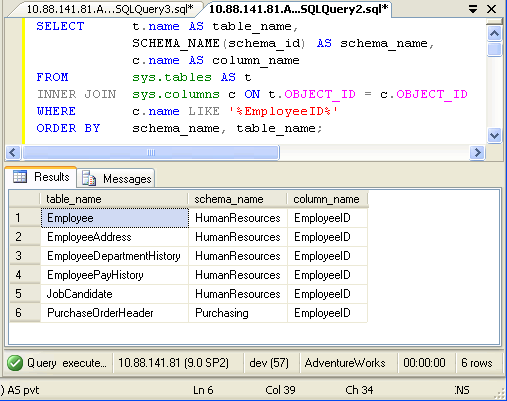
How many tables in database AdventureWorks have column name like ‘EmployeeID’?

It was quite an interesting question and I thought if there are scripts which can do this would be great. I quickly wrote down following script which will go return all the tables containing specific column along with their schema name.

USE AdventureWorks
GO
SELECT t.name AS table_name,
SCHEMA_NAME(schema_idAS schema_name,
c.name AS column_name
FROM sys.tables AS t
INNER JOIN sys.columns c ON t.OBJECT_ID c.OBJECT_ID
WHERE c.name LIKE '%EmployeeID%'
ORDER BY schema_nametable_name;

SQL SERVER - Query to Find Column From All Tables of Database GetColumn

In above query replace EmployeeID with any other column name.

SELECT t.name AS table_name,
SCHEMA_NAME(schema_idAS schema_name,
c.name AS column_name
FROM sys.tables AS t
INNER JOIN sys.columns c ON t.OBJECT_ID c.OBJECT_ID
ORDER BY schema_nametable_name;

SQL SERVER - Query to Find Column From All Tables of Database AllColumns

If you want to find all the column name from your database run following script. You can down any condition in WHERE clause to get desired result.

Sunday, January 05, 2020

SQL SERVER Clean String function

SQL SERVER Clean String function


Create Function [dbo].[CleanString] (@input nvarchar(max))
Returns nvarchar(max)
As
Begin


declare @a nvarchar(max)
declare @b nvarchar(max)
Set @a=@input
Set @b = Replace(REPLACE(@a, SUBSTRING(@a, PATINDEX( '%[,~,@,#,/,\,(,),$,%,&,*,(,),+,.,]%', @a), 1 ),''),'-','')
Set @a=@b
Set @b = Replace(REPLACE(@a, SUBSTRING(@a, PATINDEX( '%[,~,@,#,/,\,(,),$,%,&,*,(,),+,.,]%', @a), 1 ),''),'-','')
Set @a=@b
Set @b = Replace(REPLACE(@a, SUBSTRING(@a, PATINDEX( '%[,~,@,#,/,\,(,),$,%,&,*,(,),+,.,]%', @a), 1 ),''),'-','')
Set @a=@b
Set @b = Replace(REPLACE(@a, SUBSTRING(@a, PATINDEX( '%[,~,@,#,/,\,(,),$,%,&,*,(,),+,.,]%', @a), 1 ),''),'-','')
return @b

End


Call Function on Select statement :

Select top 1 DataEntryDate ,   dbo.CleanString('A-SMN~dfs&d-fdsh/adsfdsf/sdfsdf\sdf')   from TableName


Thursday, October 24, 2019

Post data and get jason C#

  string url = "www.YOURL_URL.com";
  string soapResult = "";
                WebClient cl = new WebClient(); // create web client
                var data = cl.DownloadString(url); //    Sending request to find web api REST service resource  using HttpClient 
                JObject currencies = JObject.Parse(data);
                var currency = currencies.SelectToken("TradeLicense.trade_name_en");
                soapResult = currency.ToString();

Tuesday, August 20, 2019

Describe table structure with MS SQL Server


This is the second in a series of three posts about using the sp_tables, sp_columns and sp_stored_procedures stored procedures with Microsoft SQL Server databases. This post is about sp_columns which is used to describe the table structure of a SQL Server table.

The simplest way to use sp_columns to show the columns and related information about a SQL Server table is to execute the stored proecedure passing it the table name like so:

exec sp_columns MyTable


You can read more information about what each column returned means in the MSDN documentation about this stored procedure. The sp_columns stored procedure can take additional arguments to the table name. You can also pass the table owner, table qualifier (i.e. the database name), column name and the ODBC version used. The table owner and column name parameters support wildcard pattern matching, so you can use % and _ For example, if you only wanted to query the "foo" column from the above example, you would do this:

exec sp_columns MyTable, @column_name = 'foo'
If you wanted to query all columns which started with the letter "a" you could do the following:
exec sp_columns MyTable, @column_name = 'a%'
That's a basic overview of the sp_columns stored procedure for describing a table structure in Microsoft SQL Server. The final post in this series (in a week's time) will look at sp_stored_procedures to get a list of stored procedures available.

Sunday, July 21, 2019

Class for User Register - MVC

public class UserRegisterModel
    {
        [DisplayName("User Name")]
        [Required(ErrorMessage="Name can not be blank")]
        public string Name { get; set; }

        [Required(ErrorMessage = "Password can not be blank")]
        [StringLength(6,ErrorMessage="Password should be equal or less than 6 character")]
        public string Password { get; set; }

        [Required(ErrorMessage = "Email can not be blank")]
        [RegularExpression(@"\w+([-+.']\w+)*@\w+([-.]\w+)*\.\w+([-.]\w+)*",ErrorMessage="Email is not Valid")]
        public string Email { get; set; }
    } 

Monday, April 29, 2019

Windows 10 How to send a command line message to another PC on the network?

How to send a command line message to another PC on the network?
1. Start command prompt (cmd) – type cmd in the searchbox and run the app

2. Type the command as follows:

msg /SERVER:DestinationPC * /TIME:60 “This is the message to be sent to a PC named DestinationPC.”

– Replace DestinationPC with your destination PC name (see your computer network for the list of computers in that network if you don’t know the name pf the PC you are trying to send the message to.


– Replace the value of TIME with desired seconds before the message closes

– Replace the text between quotation marks with the message text you want to be displayed.

3. Hit enter and voila, the message is sent.

This is the relapse commend on XP Windows net send 

Monday, February 04, 2019

How to add HTML codes in Blogger Posts

If you wants to show HTML code without any customization in your blog then just use this site: SimpleCode. This method is too easy to use and it shows code in a very simple way.


Use the below
http://vault.simplebits.com/cgi-bin/simplecode.pl?mode=process


Jquery Start count and Brack timer clearTimeout()


The below JQuery Jquery Start count and Brack timer  clearTimeout()


<!DOCTYPE html>
<html>
<body>

<button onclick="startCount()">Start count!</button>
<input type="text" id="txt">
<button onclick="stopCount()">Stop count!</button>

<p>
Click on the "Start count!" button above to start the timer. The input field will count forever, starting at 0. Click on the "Stop count!" button to stop the counting. Click on the "Start count!" button to start the timer again.
</p>

<script>
var c = 0;
var t;
var timer_is_on = 0;
var myCounter = 0;

function timedCount() {
  document.getElementById("txt").value = c;
  c = c + 1;  
  
  t = setTimeout(timedCount, 1000);
  myCounter = myCounter + 1
   if(myCounter == 4)
    {
     c = 0;
     t;
     timer_is_on = 0;
     myCounter = 0;
    clearTimeout(t);
  timer_is_on = 0;
    }
   
}

function startCount() {
  if (!timer_is_on) {
    timer_is_on = 1;
    timedCount();
  
   
  }
}

function stopCount() {
 c = 0;
 t;
 timer_is_on = 0;
 myCounter = 0;
  clearTimeout(t);
  timer_is_on = 0;
}
</script>

</body>
</html>


Sunday, January 20, 2019

SQL server find search for Database , Find all stored procedures related tables


Find SP 
sp_helptext 'spname'

Find all stored procedures related tables 
SELECT *  FROM sys.procedures WHERE OBJECT_DEFINITION(OBJECT_ID) LIKE '%table_name%'

Find all stored procedures newly created
SELECT *  FROM sys.procedures order by create_date desc

Find all stored procedures newly modify
SELECT *  FROM sys.procedures order by modify_date desc

Find all tables 
SELECT * FROM sys.tables

Find table with like
Select * from sys.tables  where name like '%tablename%'


SELECT
    o.name AS ReferencingObject, 
    sd.referenced_entity_name AS ReferencedObject
FROM sys.sql_expression_dependencies  AS sd
INNER JOIN sys.objects AS o
    ON o.object_id = sd.referencing_id
WHERE sd.referenced_entity_name = 'Tabel_Name';


 SELECT name, type   FROM dbo.sysobjects
 WHERE (type = 'P')


Sunday, March 04, 2018

"The Devoted Friend" by P. Craig Russsell.

"The Devoted Friend" by P. Craig Russsell.

"The Devoted Friend" is a darkly comic short story for children by the Irish author Oscar Wilde. It was first published in 1888 in the anthology The Happy Prince and Other Tales, which in addition to its title story also includes "The Nightingale and the Rose", "The Selfish Giant" and "The Remarkable Rocket".

The two main characters in "The Devoted Friend" are a poor man known as little Hans and a rich Miller. The Miller claims to be a devoted friend of little Hans. In truth, he selfishly takes advantage of little Hans at every opportunity. Little Hans always does everything that the Miller asks him to do because he does not want to lose the Miller's friendship or offend him. Little Hans' desire to remain the Miller's friend ultimately proves fatal for him.

Plot

"The Devoted Friend" takes the form of a "story-within-a-story". The main narrative is told to a Water-rat by a Linnet. The Water-rat chastises a Duck for allowing her children to misbehave. When the Duck responds that she is a good parent, the Water-rat says that he knows nothing about family life because he is single. He goes on to say that he is not interested in love but thinks that, "there is nothing in the world either nobler or rarer than a devoted friendship". When the Linnet asks the Water-rat what he would expect of a devoted friend, he replies, "I would expect my devoted friend to be devoted to me". In an attempt to show the Water-rat the foolishness of what he has said, the Linnet tells him the story of little Hans and the Miller.

During the spring, summer and autumn, little Hans makes a living by selling the flowers and fruit from his beautiful garden. During the winter, he struggles to survive. Hugh the wealthy Miller, who owns several cows and sheep in addition to his profitable mill, claims to be a good friend of little Hans. He often goes to see him from spring to autumn, always helping himself to a lot of little Hans' flowers or fruit when he visits him. The Miller never goes to see little Hans during the winter, claiming that he is certain that little Hans would not like to be bothered during that difficult time of year.

 the Miller visits little Hans. He finds out that, in order to have any money for food during the winter, little Hans was forced to sell several of his possessions, including his wheelbarrow. The Miller tells Hans that he will give him his old wheelbarrow, which is in very bad condition with one side completely missing. Hans replies that he can repair the wheelbarrow because he has a plank of wood in his house. The Miller says that the plank is exactly what he needs to fix the hole in the roof of his barn. The Miller goes on to ask Hans to fill a large basket with flowers. The Miller tells Hans that it would be unfriendly to refuse him the flowers or the plank since he has promised him his wheelbarrow.

The following day, the Miller tells little Hans to take a sack of flour to market for him. The next day, he tells Hans to fix his barn roof. The day after that, he tells Hans to drive his sheep to the mountain. Each day, the Miller has another task for little Hans which takes Hans all day to perform. The Miller always tells Hans that it would be unfriendly of him to refuse and reminds him that he has promised to give him his wheelbarrow. Little Hans has no time to tend to the garden which he depends on to make a living.

On a stormy night, the Miller comes to little Hans' house. He says that his son is injured and tells little Hans to fetch the doctor. He refuses to lend Hans his lantern because it is a new one. Again, he reminds little hans that he has promised to give him his wheelbarrow and that it would be unfriendly to refuse to help him. Little Hans follows the doctor back to the Miller's house. However, since Hans does not have a lantern and it is raining so heavily that it is difficult to see, Hans gets lost. He wanders onto the moor and drowns in a pool.

The Miller concludes that little Hans died because he promised to give him his wheelbarrow for free. He says, "I will certainly take care not to give anything away again. One always suffers for being generous".

After having heard the story, the Water-rat says that he feels sorry for the sensitive Miller. The Linnet points out that there is a moral to the story which the Water-rat has failed to understand. The Water-rat is horrified when he finds out that the story was supposed to have a moral and leaves in disgust.

Wednesday, November 08, 2017

Visual Studio 2015 Keyboard shortcuts Ctrl+Shift+R Find relapse

T to access the Find/Replace in Files dialog box, choose Find and Replace on the Edit menu (or CTRL+SHIFT+F). When you choose Find All, a Find Results window opens and lists the matches for your search.

Keyboard shortcuts Ctrl+Shift+R and Ctrl+Shift+P are assigned to the Record Macro and Run Macro commands if they are not used in your Visual Studio keyboard scheme. If they are used, but you want to reassign them to Visual Commander, you can manually assign them in Visual Studio keyboard options for the VCmd.RecordMacro and VCmd.RunMacro commands.
There is only one macro - recording the new macro overwrites the previous one. If you want to save the macro for future regular use, you can manually copy its code to a new command or use the explicit Save Macro as Command menu item.
You can record Find Next and Find Previous commands from the Find and Replace dialog: Find and Replace dialog in Visual Studio 2013

Sunday, February 26, 2017

Packaging InDesign Files (detailed instructions)

Many new InDesign users have discovered “the hard way” that simply e-mailing their InDesign file to someone will not allow that person to properly use their file. Their InDesign file depends on fonts and linked graphics that must be sent along with it in order for it to work properly.Fortunately, InDesign has a built-in Package utility that creates a folder with a name of your choice, puts a copy of your document into the folder, and then copies all necessary fonts and images into the folder as well. Generally you will create a package, zip it up, and then send it to whoever needs it. Simple, right?
Here are detailed instructions:
  1. Open your INDD file in InDesign.
  2. If possible, resolve any errors concerning missing links or fonts.
  3. Go to File: Package.
  4. Click the Package button at the bottom of the Summary window (This window was called the preflight window in older versions).
  5. Click continue on the “Printing Instructions” window (most people ignore these instructions).
  6. Browse to where you’d like to create the package folder (desktop would be fine) and enter the name of the folder.
  7. Make sure that the “Copy Fonts,” “Copy Linked Graphics,” “Update Graphic  Links in Package,” and “Include Fonts and Links from Hidden….” are all checked. Other boxes should be unchecked.
  8. Click the package button.
  9. Find the new folder that InDesign created and verify that it contains copies of all required files.
  10. Right-click the folder and choose “Compress” (Mac) or “Send to ZIP” (Windows, might be something different but similar depending on what software you have installed). This will zip it up.
  11. If the file size is less than 10MB, you can probably safely e-mail it. If it’s more, then you should use some other method (DropBox, FTP, YouSendIt, web server, etc.) to share the file.

Sunday, February 19, 2017

recover memory card data

فری ہیں اور انٹرنیٹ سے باآسانی ڈاﺅن لوڈ کئے جا سکتے ہیں۔ "CG Security" کمپنی کا "PhotoRec" سافٹ وئیر بہترین آپشن ہے جو ونڈوز اور میک دونوں کیلئے دستیاب ہے لیکن اس کا انٹرفیس تھوڑا سا مشکل ہے تاہم ایک اور کمپنی "piriform" کا سافٹ وئیر "Recuva" اس کے متبادل کے طور پر استعمال کیا جا سکتا ہے جس کا انٹرفیس انتہائی آسان ہے لیکن یہ سافٹ وئی صرف ونڈوز آپریٹنگ سسٹم کیلئے دستیاب ہے۔
پہلا سٹیپ:۔ اپنا میموری کارڈ کمپیوٹر کے ساتھ کنیکٹ کریں اور "PhotoRec" سافٹ وئیر کو لانچ کریں۔ دوسرا سٹیپ:۔ اپنے کی بورڈ پر موجود ”ایرو کیز“ کو استعمال کرتے ہوئے فراہم کی گئی لسٹ میں سے اپنا میموری کارڈ سلیکٹ کریں۔( اگر آپ کو میموری کارڈ ڈھونڈنے میں پریشانی ہو رہی ہے تو آپ اس کے سائز کا اندازہ لگا سکتے ہیں)۔ صحیح ڈرائیو لیٹر ڈھونے کے بعد ”اینٹر“ پریس کریں ۔ آپ کے سامنے ایک نئی سکرین آ جائے گی۔


تیسرا سٹیپ:۔ اب آپ اس سکرین پر موجود آپش "FAT32" کو سلیکٹ کریں ۔
چوتھا سٹیپ:۔ آپ کے سامنے اسی ونڈو پر مزید دو آپشنز "Free" اور "Whole" آ جائیں گی۔ اگر آپ ڈیلیٹ شدہ مواد واپس لانا چاہتے ہیں تو "Free" آپشن پر کلک کریں اور اگر آپ کا میموری کارڈ کرپٹ ہے تو "Whole" آپشن کو سلیکٹ کریں۔


پانچواں سٹیپ:۔ اب یہ سافٹ وئیر میموری کارڈ کی سے ملنے والی فائلز کو سیو کرنے کی جگہ منتخب کرنے کو کہے گا۔ لہٰذا آپ کی بورڈ پر موجود ایرو کیز کے استعمال سے مطلوبہ جگہ کا انتخاب کریں اور پھر کنفرمیشن کیلئے "C" کا بٹن دبائیں۔ یہ سافٹ وئیر ریکوری پراسیس شروع کر دے گا اور زیادہ سے زیادہ 30 منٹ میں یہ عمل مکمل ہو جائے گا تاہم سکیننگ کا وقت میموری کارڈ کے سائز پر منحصر ہے۔ امید ہے کہ اس آپشن کے استعمال سے آپ کا اہم ڈیٹا، تصاویر یا ویڈیوز واپس مل جائیں گے۔