Showing posts with label SQL Server. Show all posts

Monday, February 22, 2021

How to Backup a table in SQL Server with SELECT INTO statement

 The first method involves using a SELECT INTO statement to create a copy of the table. The basic format of this statement is as follows:


SELECT *
INTO tableCopy
FROM originalTable


This statement WILL CREATE the table called tableCopy, thus you do not have to previously create it. Due to the fact that the statement is a SELECT statement, you can have WHERE clauses if you want to filter your data, or you can add specific columns into your table copy, if not the entire table should be backed up.

This form of backing up a table is not as the traditional method of backing up a database to a file, as it is just a simple way to create a copy of a table, in the same database, which you can later use in the form of a backup.

Advantages:

      • This method is by far the fastest. It can copy a very large number of rows very quickly.

Disadvantages:

      • Unfortunately, by using SELECT INTO, the major downfall is that it does not carry over the Keys, Indexes and Constraints of the table.
      • Also, the backup of the table is still stored in the database

Thursday, December 03, 2020

SQL Server CURSOR

 DECLARE

@product_name VARCHAR(MAX), @list_price DECIMAL; DECLARE cursor_product CURSOR FOR SELECT product_name, list_price FROM production.products; OPEN cursor_product; FETCH NEXT FROM cursor_product INTO @product_name, @list_price; WHILE @@FETCH_STATUS = 0 BEGIN PRINT @product_name + CAST(@list_price AS varchar); FETCH NEXT FROM cursor_product INTO @product_name, @list_price; END; CLOSE cursor_product; DEALLOCATE cursor_product;

Tuesday, September 08, 2020

SQL SERVER – Query to Find Column From All Tables of Database

 One question came up just a day ago while I was writing SQL SERVER – 2005 – Difference Between INTERSECT and INNER JOIN – INTERSECT vs. INNER JOIN.

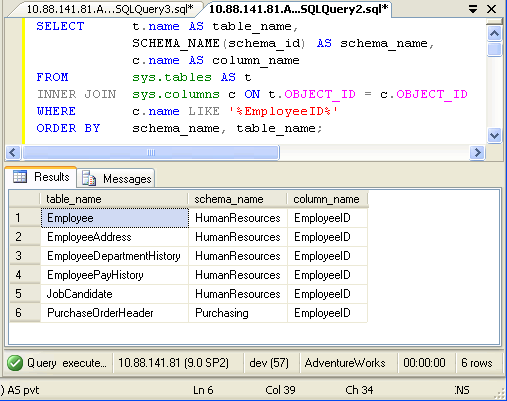
How many tables in database AdventureWorks have column name like ‘EmployeeID’?

It was quite an interesting question and I thought if there are scripts which can do this would be great. I quickly wrote down following script which will go return all the tables containing specific column along with their schema name.

USE AdventureWorks
GO
SELECT t.name AS table_name,
SCHEMA_NAME(schema_id) AS schema_name,
c.name AS column_name
FROM sys.tables AS t
INNER JOIN sys.columns c ON t.OBJECT_ID = c.OBJECT_ID
WHERE c.name LIKE '%EmployeeID%'
ORDER BY schema_name, table_name;

SQL SERVER - Query to Find Column From All Tables of Database GetColumn

In above query replace EmployeeID with any other column name.

SELECT t.name AS table_name,
SCHEMA_NAME(schema_id) AS schema_name,
c.name AS column_name
FROM sys.tables AS t
INNER JOIN sys.columns c ON t.OBJECT_ID = c.OBJECT_ID
ORDER BY schema_name, table_name;

SQL SERVER - Query to Find Column From All Tables of Database AllColumns

If you want to find all the column name from your database run following script. You can down any condition in WHERE clause to get desired result.

Sunday, January 05, 2020

SQL SERVER Clean String function

SQL SERVER Clean String function


Create Function [dbo].[CleanString] (@input nvarchar(max))
Returns nvarchar(max)
As
Begin


declare @a nvarchar(max)
declare @b nvarchar(max)
Set @a=@input
Set @b = Replace(REPLACE(@a, SUBSTRING(@a, PATINDEX( '%[,~,@,#,/,\,(,),$,%,&,*,(,),+,.,]%', @a), 1 ),''),'-','')
Set @a=@b
Set @b = Replace(REPLACE(@a, SUBSTRING(@a, PATINDEX( '%[,~,@,#,/,\,(,),$,%,&,*,(,),+,.,]%', @a), 1 ),''),'-','')
Set @a=@b
Set @b = Replace(REPLACE(@a, SUBSTRING(@a, PATINDEX( '%[,~,@,#,/,\,(,),$,%,&,*,(,),+,.,]%', @a), 1 ),''),'-','')
Set @a=@b
Set @b = Replace(REPLACE(@a, SUBSTRING(@a, PATINDEX( '%[,~,@,#,/,\,(,),$,%,&,*,(,),+,.,]%', @a), 1 ),''),'-','')
return @b

End


Call Function on Select statement :

Select top 1 DataEntryDate ,   dbo.CleanString('A-SMN~dfs&d-fdsh/adsfdsf/sdfsdf\sdf')   from TableName


Tuesday, August 20, 2019

Describe table structure with MS SQL Server


This is the second in a series of three posts about using the sp_tables, sp_columns and sp_stored_procedures stored procedures with Microsoft SQL Server databases. This post is about sp_columns which is used to describe the table structure of a SQL Server table.

The simplest way to use sp_columns to show the columns and related information about a SQL Server table is to execute the stored proecedure passing it the table name like so:

exec sp_columns MyTable


You can read more information about what each column returned means in the MSDN documentation about this stored procedure. The sp_columns stored procedure can take additional arguments to the table name. You can also pass the table owner, table qualifier (i.e. the database name), column name and the ODBC version used. The table owner and column name parameters support wildcard pattern matching, so you can use % and _ For example, if you only wanted to query the "foo" column from the above example, you would do this:

exec sp_columns MyTable, @column_name = 'foo'
If you wanted to query all columns which started with the letter "a" you could do the following:
exec sp_columns MyTable, @column_name = 'a%'
That's a basic overview of the sp_columns stored procedure for describing a table structure in Microsoft SQL Server. The final post in this series (in a week's time) will look at sp_stored_procedures to get a list of stored procedures available.

Sunday, January 20, 2019

SQL server find search for Database , Find all stored procedures related tables


Find SP 
sp_helptext 'spname'

Find all stored procedures related tables 
SELECT *  FROM sys.procedures WHERE OBJECT_DEFINITION(OBJECT_ID) LIKE '%table_name%'

Find all stored procedures newly created
SELECT *  FROM sys.procedures order by create_date desc

Find all stored procedures newly modify
SELECT *  FROM sys.procedures order by modify_date desc

Find all tables 
SELECT * FROM sys.tables

Find table with like
Select * from sys.tables  where name like '%tablename%'


SELECT
    o.name AS ReferencingObject, 
    sd.referenced_entity_name AS ReferencedObject
FROM sys.sql_expression_dependencies  AS sd
INNER JOIN sys.objects AS o
    ON o.object_id = sd.referencing_id
WHERE sd.referenced_entity_name = 'Tabel_Name';


 SELECT name, type   FROM dbo.sysobjects
 WHERE (type = 'P')


Monday, April 06, 2015

SQL SERVER – Introduction Basic of JOINs (INNER JOIN / OUTER JOIN / FULL OUTER JOIN)

The launch of Gandhinagar SQL Server User Group was a tremendous, astonishing success! It was overwhelming to see a large gathering of enthusiasts looking up to me (I was the Key Speaker) eager to enhance their knowledge and participate in some brainstorming discussions. Some members of User Group had requested me to write a simple article on JOINS elucidating its different types.

INNER JOIN

This join returns rows when there is at least one match in both the tables.

Tuesday, January 20, 2015

Basic Tips for Software Development Managers

Basic Tips for Software Development Managers

1. Look out for pitfalls in project requirements
2. Build the right team
3. Facilitate communication between developers

All software projects are different and each new task might bring unexpected challenges for the team in the middle of a development phase. However, by following some basic concepts mentioned above, project managers can minimize potential risks before even starting development. Having built a good foundation, you can make sure you have enough time and resources to finish every project well and on time.

Wednesday, August 13, 2014

Solution for "Previous releases of Microsoft Visual Studio 2008 - failed".


Today I tried to install SQL Server 2008 Version after installed Visual Studio Team Suite 2008.

In the "Installation Rules" Section, I got the error "Rule "Previous releases of Microsoft Visual Studio 2008" failed." as shown below


SQL Server 2008 installation dependency problems with Visual Studio 2008 SP1

 While installing SQL Server 2008 on a 64bit machine with Visual Studio 2008 SP1 installed you may come across a dependency check error:

Rule "Previous releases of Microsoft Visual Studio 2008" failed.
A previous release of Microsoft Visual Studio 2008 is installed on this computer. Upgrade Microsoft Visual Studio 2008 to the SP1 before installing SQL Server 2008.

This error is documented on KB 956139, "Actions that are required before you install SQL Server 2008 on a computer that has Visual Studio 2008 or the prerelease version of SQL Server 2008 installed".

I had Visual Studio SP1 (version 9.0.30729.1 SP) properly installed on my machine, so why this message? Well, with a quick monitoring using Process Monitor I noticed that the setup process was looking for ServicePack information on the WoW64 registry key, that was outdated:
image
HKEY_LOCAL_MACHINE\SOFTWARE\Wow6432Node\Microsoft\DevDiv\VS\Servicing\9.0\IDE\1033


In order to fix it, you can update the SP and SPIndex entries to 1 and the SPName to SP1; just like the registry key at HKEY_LOCAL_MACHINE\SOFTWARE\Microsoft\DevDiv\VS\Servicing\9.0\BSLN\1033:"
image

Tuesday, May 20, 2014

Asma Qureshi - Sr.Software Developer

Its Asma Qureshi, Working in DUBAI.
Senior/lead level software / Web developer with 9 years experience developing applications / Webs with broad set of technologies and domains. Love solving hard problems, fixing impossible bugs and learning new things.

Objective: Work that is challenging, solve real problems and deliver value .I have keen interest to make easl UI Aps

Computing skills: Programming experience with C#, VB.NET, ASP.NET ,JavaScript, PHP, SQL Server 2008. 2010 ,  Crystal Report,  Development experience with Web, Windows platforms. Expertise in system architecture, design and development using object oriented design principles and relational database model.

Technical Tools: Visual Studio, HTML/HTML5, CSS, .NET Framework, JQury, ASP.NET, ASP.NET MVC, Windows Forms, WPF, Silverlight, WCF, XML, web services in asp.net , Microsoft SQL Server, IIS.

Tuesday, April 22, 2014

SQL select row where id=max(id)

How to get MEX id of your table Primary Key.
The MAX() function returns the largest value of the selected column.

SQL MAX() Syntax

SELECT MAX(column_name) FROM table_name;

SELECT * FROM  tablename WHERE    id = (SELECT MAX(id ) FROM tablename

Demo Database

In this tutorial we will use the well-known Northwind sample database.
Below is a selection from the "Products" table:
ProductID ProductName SupplierID CategoryID Unit Price
1 Chais 1 1 10 boxes x 20 bags 18
2 Chang 1 1 24 - 12 oz bottles 19
3 Aniseed Syrup 1 2 12 - 550 ml bottles 10
4 Chef Anton's Cajun Seasoning 2 2 48 - 6 oz jars 21.35
5 Chef Anton's Gumbo Mix 2 2 36 boxes 25


SQL MAX() Example

The following SQL statement gets the largest value of the "Price" column from the "Products" table:

Example

SELECT MAX(ProductID) AS maxProductID FROM Products;

Monday, April 14, 2014

SQL SERVER – Search Stored Procedure

If  you have the numbers of Stored Procedures in your database, it will be difficult to find a Stored Procedure you want to see / modify / changes in that, so for this issue you can search your Stored Procedure with below Syntex.

From this you can view Stored Procedure to display by text (code)

Syntax 01
sp_helptext @objname = 'sp_name'

From the below Syntax you can select all SP names and you can also search with Link operator too.

Syntax 02
Syntax
SELECT *  FROM sys.procedures;

Sunday, May 19, 2013

SQL Server 2000/2005 show all tables in a Database


This Query gives you all the Tables in Database.


Select table_name FROM Information_Schema.Tables

Sunday, November 25, 2012

SQL Query Add new Column Existing Table

The SQL ALTER TABLE statement allows you to rename an existing table. It can also be used to add, modify, or drop a column from an existing table.

SQL ALTER TABLE - Renaming a table

To rename a table, the SQL ALTER TABLE syntax is:
ALTER TABLE table_name
  RENAME TO new_table_name;
For example:
ALTER TABLE suppliers
  RENAME TO vendors;
This will rename the suppliers table to vendors.

SQL ALTER TABLE - Adding column(s) to a table

Syntax #1
To add a column to an existing table, the SQL ALTER TABLE syntax is:
ALTER TABLE table_name
  ADD column_name column-definition;
For example:
ALTER TABLE supplier
  ADD supplier_name varchar2(50);
This will add a column called supplier_name to the supplier table.

Friday, June 15, 2012

SQL SERVER – Stored Procedure to display code (text) of Stored Procedure, Trigger, View or Object

This is another popular question I receive. How to see text/content/code of Stored Procedure. System stored procedure that prints the text of a rule, a default, or an unencrypted stored procedure, user-defined function, trigger, or view.

Syntax sp_helptext @objname = 'name'

sp_helptext [ @objname = ] 'name' [ , [ @columnname = ] computed_column_name

Displaying the definition of a trigger or stored procedure sp_helptext 'dbo.nameofsp'


Sunday, October 24, 2010

SQL number with .00 decimal 2 disgits

SQL number with .00 decimal 2 disgits

Query
SELECT CONVERT(VARCHAR,CONVERT(VARCHAR,786),0) as Currency_COL

Result
------------------
Currency_COL
------------------
780.00
------------------


Wednesday, October 06, 2010

How to use CASE function to form conditional expressions?

Introduction
Here I will describe the function in the SQL with conditional expressions or CASE   function in your SQL Query
Execute the following Microsoft SQL Server T-SQL database scripts in Management Studio Query Editor to demonstrate the use of the CASE function to build complex conditional expressions.
-- SQL CASE function in WHERE clause - QUICK SYNTAX
DECLARE @ProductID INT = NULL -- input parameter
SELECT * FROM AdventureWorks2008.Production.Product
WHERE ProductID = CASE
WHEN @ProductID is not null THEN @ProductID
ELSE ProductID END
GO
-- (504 row(s) affected)
DECLARE @ProductID INT = 800 -- input parameter
SELECT * FROM AdventureWorks2008.Production.Product
WHERE ProductID = CASE
WHEN @ProductID is not null THEN @ProductID
ELSE ProductID END
-- (1 row(s) affected)

How to compare two tables for differences in SQL Server?

Execute the following Microsoft SQL Server 2008 T-SQL scripts in Query Editor to demonstrate the comparison of two tables for differences in rows and/or columns (cells).
------------
-- SQL SERVER COMPARE 2 TABLES FOR ROW & COLUMN DIFFERENCES
------------
-- TEMPLATE - SQL Server T-SQL compare two tables
SELECT Label='Found IN Table1, NOT IN Table2',* FROM
(SELECT * FROM Table1
EXCEPT
SELECT * FROM Table2) x
UNION ALL
SELECT Label='Found IN Table2, NOT IN Table1',* FROM
(SELECT * FROM Table2
EXCEPT
SELECT * FROM Table1) y
GO
------------
-- SQL Server T-SQL compare Product tables for 2005 & 2008
SELECT Label='Found IN AW8PP, NOT IN AWPP',* FROM
(SELECT * FROM AdventureWorks2008.Production.Product
EXCEPT
SELECT * FROM AdventureWorks.Production.Product) x
UNION ALL
SELECT Label='Found IN AWPP, NOT IN AW8PP',* FROM
(SELECT * FROM AdventureWorks.Production.Product
EXCEPT
SELECT * FROM AdventureWorks2008.Production.Product) y
GO
-- The two tables are identical
-- (0 row(s) affected
------------

How to convert from string to date / datetime?

 Introduction:

Here I will explain how to convert
string date time into date in MS SQL Server queries with the  formats of Date and Time in SQL.

 
Execute the following T-SQL scripts in Microsoft SQL Server Manangement Studio Query Editor to demonstrate T-SQL convert and cast functions in transforming string date, string time & string datetime data to datetime data type. T-SQL date / datetime functions usage examples are presented as well.
-- SQL Server string to date / datetime conversion - datetime string format sql server
-- MSSQL string to datetime conversion - convert char to date - convert varchar to date
-- Subtract 100 from style number (format) for yy instead yyyy (or ccyy with century)
SELECT convert(datetime, 'Oct 23 2012 11:01AM', 100) -- mon dd yyyy hh:mmAM (or PM)
SELECT convert(datetime, 'Oct 23 2012 11:01AM') -- 2012-10-23 11:01:00.000
-- Without century (yy) string date conversion - convert string to datetime function