How to open Package manager Visual Studio .Net
Tools >>NuGet Package manager >> Package manager console

How to open Package manager Visual Studio .Net
Tools >>NuGet Package manager >> Package manager console
The first method involves using a SELECT INTO statement to create a copy of the table. The basic format of this statement is as follows:
SELECT *
INTO tableCopy
FROM originalTable
This statement WILL CREATE the table called tableCopy, thus you do not have to previously create it. Due to the fact that the statement is a SELECT statement, you can have WHERE clauses if you want to filter your data, or you can add specific columns into your table copy, if not the entire table should be backed up.
This form of backing up a table is not as the traditional method of backing up a database to a file, as it is just a simple way to create a copy of a table, in the same database, which you can later use in the form of a backup.
Advantages:
Disadvantages:
DECLARE
@product_name VARCHAR(MAX), @list_price DECIMAL; DECLARE cursor_product CURSOR FOR SELECT product_name, list_price FROM production.products; OPEN cursor_product; FETCH NEXT FROM cursor_product INTO @product_name, @list_price; WHILE @@FETCH_STATUS = 0 BEGIN PRINT @product_name + CAST(@list_price AS varchar); FETCH NEXT FROM cursor_product INTO @product_name, @list_price; END; CLOSE cursor_product; DEALLOCATE cursor_product;How to post JSON to a server using C#?
OR
Calling REST API in C# (Read JSON Data)
Sample Code C#:
var httpWebRequest = (HttpWebRequest)WebRequest.Create("http://url");
httpWebRequest.ContentType = "application/json";
httpWebRequest.Method = "POST";

using (var streamWriter = new StreamWriter(httpWebRequest.GetRequestStream()))
{
    string json = "{\"user\":\"test\"," +
                  "\"password\":\"bla\"}";

    streamWriter.Write(json);
}

var httpResponse = (HttpWebResponse)httpWebRequest.GetResponse();
using (var streamReader = new StreamReader(httpResponse.GetResponseStream()))
{
    var result = streamReader.ReadToEnd();
}
//*************************************************************************//
 var httpWebRequest = (HttpWebRequest)WebRequest.Create("YOU API URL");
            httpWebRequest.ContentType = "application/json";
            httpWebRequest.Method = "POST";
            httpWebRequest.Headers.Add("APIKey", "111111111111111111");
            using (var streamWriter = new StreamWriter(httpWebRequest.GetRequestStream()))
            {
                string json = JsonConvert.SerializeObject(new
                {
                    appId = "XXXX",
                    vehicleRequestChoice = new
                    {
                        plateDetails = new
                        {
                            plateCategory = "Private",
                            plateCode = "T",
                            plateNo = "11111"
                        }
                    }
                }
                );
                streamWriter.Write(json);
            }

            var httpResponse = (HttpWebResponse)httpWebRequest.GetResponse();
            using (var streamReader = new StreamReader(httpResponse.GetResponseStream()))
            {
                if (httpResponse.StatusCode == HttpStatusCode.OK)
                {
                    var result = streamReader.ReadToEnd();
                    var testobj = JsonConvert.DeserializeObject(result);
                    return testobj;
                }


            }
//***************** END ******************//One question came up just a day ago while I was writing SQL SERVER – 2005 – Difference Between INTERSECT and INNER JOIN – INTERSECT vs. INNER JOIN.
How many tables in database AdventureWorks have column name like ‘EmployeeID’?
It was quite an interesting question and I thought if there are scripts which can do this would be great. I quickly wrote down following script which will go return all the tables containing specific column along with their schema name.
USE AdventureWorks
GO
SELECT t.name AS table_name,
SCHEMA_NAME(schema_id) AS schema_name,
c.name AS column_name
FROM sys.tables AS t
INNER JOIN sys.columns c ON t.OBJECT_ID = c.OBJECT_ID
WHERE c.name LIKE '%EmployeeID%'
ORDER BY schema_name, table_name;
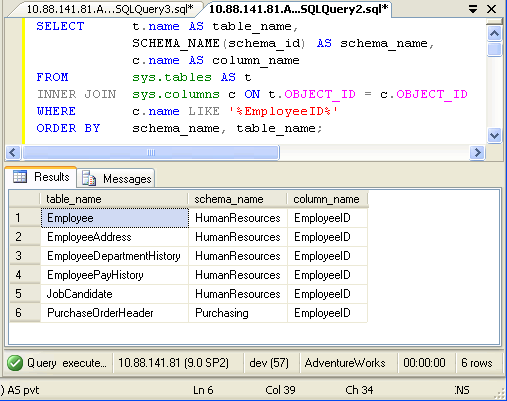
In above query replace EmployeeID with any other column name.
SELECT t.name AS table_name,
SCHEMA_NAME(schema_id) AS schema_name,
c.name AS column_name
FROM sys.tables AS t
INNER JOIN sys.columns c ON t.OBJECT_ID = c.OBJECT_ID
ORDER BY schema_name, table_name;

If you want to find all the column name from your database run following script. You can down any condition in WHERE clause to get desired result.
