Ye Haath Salamat Hain Jab Tak
Is Khoon May Hararat Hai Jab Tak
Is Dil May Sadaqat Hai Jab Tak
Saturday, November 14, 2009

Wednesday, November 11, 2009
Adding Row Number to SQL SELECT result
ntroduction This article will explain how we can add sequence row number to a SQL select query starting from 1 onwards. This can be achieved by using built in SQL function ?ROW_NUMBER()?. This function simply generates row number for each row in the result. You can specify the partition and order by criteria. This is how it works:
e.g. Suppose we have a table ?Employees?.
Use of ROW_NUMBER() will assign sequence number to rows as:
e.g. Suppose we have a table ?Employees?.
SELECT EmployeeId, EmployeeName, Salary
   FROM Employees

EmployeeId   EmployeeName     Salary
-------------------------------------
1002         Alden            4000
2343         Lawson           4500
2004         Barbra           4800
1105         Marsden          4500
3116         Mac              5000
Use of ROW_NUMBER() will assign sequence number to rows as:
SELECT ROW_NUMBER()
       OVER (ORDER BY EmployeeName) AS Row,
   EmployeeId, EmployeeName, Salary
FROM Employees

Row   EmployeeId   EmployeeName     Salary
-------------------------------------------
1     1002         Alden            4000
2     2343         Lawson           4500
3     2004         Barbra           4800
4     1105         Marsden          4500
5     3116         Mac              5000
Using ROW_NUMBER() for calculating Nth highest salary
We can utilize this function for calculating Nth highest salary of a employee. Suppose we want to find employee with 4th highest salary. This can be done as:SELECT * FROM
(SELECT ROW_NUMBER()
OVER (ORDER BY Salary) AS Row,
EmployeeId, EmployeeName, Salary
FROM Employees) AS EMP
WHERE Row = 4
Row EmployeeId EmployeeName Salary
-------------------------------------------
4 1105 Marsden 4500
Using ROW_NUMBER() in case of pagination
This can also be used for getting rows which belongs to a particular page only. This is very common scenario of a business application where we have lots of rows in database and we want to filter based on page number.SELECT * FROM
(SELECT ROW_NUMBER()
OVER (ORDER BY EmployeeName) AS Row,
EmployeeId, EmployeeName, Salary
FROM Employees) AS EMP
WHERE Row BETWEEN 2 AND 4
Row EmployeeId EmployeeName Salary
-------------------------------------------
2 2343 Lawson 4500
3 2004 Barbra 4800
4 1105 Marsden 4500
happy programming :D
Wednesday, October 28, 2009
Using the CASE expression instead of dynamic SQL in SQL Server
Problem
I have a lot of SQL update queries where I need to make IF/ELSE types of decisions. I am using a cursor in some cases but looping through thousands of rows for update takes a long time. I also use some dynamic SQL to handle some query parameter decision making. Is there a better alternative?
Solution
The CASE expression is a really powerful tool that can you use to solve your SQL Server query problems. You're probably familiar with its use in mimicking if/else processing when issuing SELECT statements. However, its use is not confined strictly to this kind of processing.
Among the ways I've leveraged the CASE expression in my code:
- To eliminate a cursor loop when updating rows
- To perform specialized processing when using aggregate functions
- To create dynamic ORDER BY and WHERE clauses without using dynamic SQL
Let's look at some examples
We'll first create a new table called Customer and insert some rows
CREATE TABLE dbo.Customer |
Example 1
A requirement has come in to denormalize the table for reporting purposes by adding a state description column. Now, you could use a cursor and loop through the table, updating each row, but cursors can be performance killers. You could also create multiple UPDATE statements, but that would be unwieldly. Instead, you can use an UPDATE statement with CASE to efficiently update the table with one SET operation.
ALTER TABLE dbo.Customer ADD statedescription VARCHAR(50) NULL |
Example 2
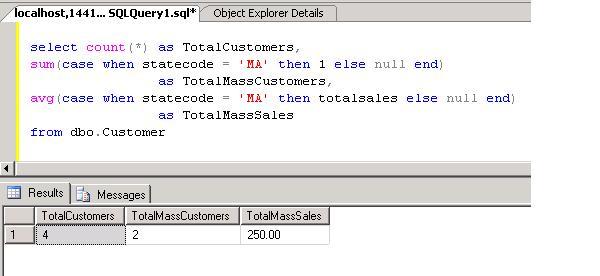
A second requirement has come in where we need to report on the total number of all customers, the total number of all Massachusetts customers, and an average of all sales made by all Massachusetts customers. We could limit the query to just Massachusetts customers but that would make it cumbersome to get our count of total customers. To solve this problem, you can write the query to use a CASE expression within the aggregate functions to get Massachusetts specific information:
SELECT COUNT(*) AS TotalCustomers, |
Since NULL values are discarded when performing aggregate functions, we can easily get the required totals.
Monday, October 26, 2009
Sql server - Standard Date Formats
SQL Server Date Formats
| Standard Date Formats | |||
| Date Format | Standard | SQL Statement | Sample Output |
| Mon DD YYYY 1 HH:MIAM (or PM) | Default | SELECT CONVERT(VARCHAR(20), GETDATE(), 100) | Jan 1 2005 1:29PM 1 |
| MM/DD/YY | USA | SELECT CONVERT(VARCHAR(8), GETDATE(), 1) AS [MM/DD/YY] | 11/23/98 |
| MM/DD/YYYY | USA | SELECT CONVERT(VARCHAR(10), GETDATE(), 101) AS [MM/DD/YYYY] | 11/23/1998 |
| YY.MM.DD | ANSI | SELECT CONVERT(VARCHAR(8), GETDATE(), 2) AS [YY.MM.DD] | 72.01.01 |
| YYYY.MM.DD | ANSI | SELECT CONVERT(VARCHAR(10), GETDATE(), 102) AS [YYYY.MM.DD] | 1972.01.01 |
| DD/MM/YY | British/French | SELECT CONVERT(VARCHAR(8), GETDATE(), 3) AS [DD/MM/YY] | 19/02/72 |
| DD/MM/YYYY | British/French | SELECT CONVERT(VARCHAR(10), GETDATE(), 103) AS [DD/MM/YYYY] | 19/02/1972 |
| DD.MM.YY | German | SELECT CONVERT(VARCHAR(8), GETDATE(), 4) AS [DD.MM.YY] | 25.12.05 |
| DD.MM.YYYY | German | SELECT CONVERT(VARCHAR(10), GETDATE(), 104) AS [DD.MM.YYYY] | 25.12.2005 |
| DD-MM-YY | Italian | SELECT CONVERT(VARCHAR(8), GETDATE(), 5) AS [DD-MM-YY] | 24-01-98 |
| DD-MM-YYYY | Italian | SELECT CONVERT(VARCHAR(10), GETDATE(), 105) AS [DD-MM-YYYY] | 24-01-1998 |
| DD Mon YY 1 | - | SELECT CONVERT(VARCHAR(9), GETDATE(), 6) AS [DD MON YY] | 04 Jul 06 1 |
| DD Mon YYYY 1 | - | SELECT CONVERT(VARCHAR(11), GETDATE(), 106) AS [DD MON YYYY] | 04 Jul 2006 1 |
| Mon DD, YY 1 | - | SELECT CONVERT(VARCHAR(10), GETDATE(), 7) AS [Mon DD, YY] | Jan 24, 98 1 |
| Mon DD, YYYY 1 | - | SELECT CONVERT(VARCHAR(12), GETDATE(), 107) AS [Mon DD, YYYY] | Jan 24, 1998 1 |
| HH:MM:SS | - | SELECT CONVERT(VARCHAR(8), GETDATE(), 108) | 03:24:53 |
| Mon DD YYYY HH:MI:SS:MMMAM (or PM) 1 | Default + milliseconds | SELECT CONVERT(VARCHAR(26), GETDATE(), 109) | Apr 28 2006 12:32:29:253PM 1 |
| MM-DD-YY | USA | SELECT CONVERT(VARCHAR(8), GETDATE(), 10) AS [MM-DD-YY] | 01-01-06 |
| MM-DD-YYYY | USA | SELECT CONVERT(VARCHAR(10), GETDATE(), 110) AS [MM-DD-YYYY] | 01-01-2006 |
| YY/MM/DD | - | SELECT CONVERT(VARCHAR(8), GETDATE(), 11) AS [YY/MM/DD] | 98/11/23 |
| YYYY/MM/DD | - | SELECT CONVERT(VARCHAR(10), GETDATE(), 111) AS [YYYY/MM/DD] | 1998/11/23 |
| YYMMDD | ISO | SELECT CONVERT(VARCHAR(6), GETDATE(), 12) AS [YYMMDD] | 980124 |
| YYYYMMDD | ISO | SELECT CONVERT(VARCHAR(8), GETDATE(), 112) AS [YYYYMMDD] | 19980124 |
| DD Mon YYYY HH:MM:SS:MMM(24h) 1 | Europe default + milliseconds | SELECT CONVERT(VARCHAR(24), GETDATE(), 113) | 28 Apr 2006 00:34:55:190 1 |
| HH:MI:SS:MMM(24H) | - | SELECT CONVERT(VARCHAR(12), GETDATE(), 114) AS [HH:MI:SS:MMM(24H)] | 11:34:23:013 |
| YYYY-MM-DD HH:MI:SS(24h) | ODBC Canonical | SELECT CONVERT(VARCHAR(19), GETDATE(), 120) | 1972-01-01 13:42:24 |
| YYYY-MM-DD HH:MI:SS.MMM(24h) | ODBC Canonical (with milliseconds) | SELECT CONVERT(VARCHAR(23), GETDATE(), 121) | 1972-02-19 06:35:24.489 |
| YYYY-MM-DDTHH:MM:SS:MMM | ISO8601 | SELECT CONVERT(VARCHAR(23), GETDATE(), 126) | 1998-11-23T11:25:43:250 |
| DD Mon YYYY HH:MI:SS:MMMAM 1 | Kuwaiti | SELECT CONVERT(VARCHAR(26), GETDATE(), 130) | 28 Apr 2006 12:39:32:429AM 1 |
| DD/MM/YYYY HH:MI:SS:MMMAM | Kuwaiti | SELECT CONVERT(VARCHAR(25), GETDATE(), 131) | 28/04/2006 12:39:32:429AM |
Here are some more date formats that does not come standard in SQL Server as part of the CONVERT function.
| Extended Date Formats | ||
| Date Format | SQL Statement | Sample Output |
| YY-MM-DD | SELECT SUBSTRING(CONVERT(VARCHAR(10), GETDATE(), 120), 3, 8) AS [YY-MM-DD] SELECT REPLACE(CONVERT(VARCHAR(8), GETDATE(), 11), '/', '-') AS [YY-MM-DD] | 99-01-24 |
| YYYY-MM-DD | SELECT CONVERT(VARCHAR(10), GETDATE(), 120) AS [YYYY-MM-DD] SELECT REPLACE(CONVERT(VARCHAR(10), GETDATE(), 111), '/', '-') AS [YYYY-MM-DD] | 1999-01-24 |
| MM/YY | SELECT RIGHT(CONVERT(VARCHAR(8), GETDATE(), 3), 5) AS [MM/YY] SELECT SUBSTRING(CONVERT(VARCHAR(8), GETDATE(), 3), 4, 5) AS [MM/YY] | 08/99 |
| MM/YYYY | SELECT RIGHT(CONVERT(VARCHAR(10), GETDATE(), 103), 7) AS [MM/YYYY] | 12/2005 |
| YY/MM | SELECT CONVERT(VARCHAR(5), GETDATE(), 11) AS [YY/MM] | 99/08 |
| YYYY/MM | SELECT CONVERT(VARCHAR(7), GETDATE(), 111) AS [YYYY/MM] | 2005/12 |
| Month DD, YYYY 1 | SELECT DATENAME(MM, GETDATE()) + RIGHT(CONVERT(VARCHAR(12), GETDATE(), 107), 9) AS [Month DD, YYYY] | July 04, 2006 1 |
| Mon YYYY 1 | SELECT SUBSTRING(CONVERT(VARCHAR(11), GETDATE(), 113), 4, 8) AS [Mon YYYY] | Apr 2006 1 |
| Month YYYY 1 | SELECT DATENAME(MM, GETDATE()) + ' ' + CAST(YEAR(GETDATE()) AS VARCHAR(4)) AS [Month YYYY] | February 2006 1 |
| DD Month 1 | SELECT CAST(DAY(GETDATE()) AS VARCHAR(2)) + ' ' + DATENAME(MM, GETDATE()) AS [DD Month] | 11 September 1 |
| Month DD 1 | SELECT DATENAME(MM, GETDATE()) + ' ' + CAST(DAY(GETDATE()) AS VARCHAR(2)) AS [Month DD] | September 11 1 |
| DD Month YY 1 | SELECT CAST(DAY(GETDATE()) AS VARCHAR(2)) + ' ' + DATENAME(MM, GETDATE()) + ' ' + RIGHT(CAST(YEAR(GETDATE()) AS VARCHAR(4)), 2) AS [DD Month YY] | 19 February 72 1 |
| DD Month YYYY 1 | SELECT CAST(DAY(GETDATE()) AS VARCHAR(2)) + ' ' + DATENAME(MM, GETDATE()) + ' ' + CAST(YEAR(GETDATE()) AS VARCHAR(4)) AS [DD Month YYYY] | 11 September 2002 1 |
| MM-YY | SELECT RIGHT(CONVERT(VARCHAR(8), GETDATE(), 5), 5) AS [MM-YY] SELECT SUBSTRING(CONVERT(VARCHAR(8), GETDATE(), 5), 4, 5) AS [MM-YY] | 12/92 |
| MM-YYYY | SELECT RIGHT(CONVERT(VARCHAR(10), GETDATE(), 105), 7) AS [MM-YYYY] | 05-2006 |
| YY-MM | SELECT RIGHT(CONVERT(VARCHAR(7), GETDATE(), 120), 5) AS [YY-MM] SELECT SUBSTRING(CONVERT(VARCHAR(10), GETDATE(), 120), 3, 5) AS [YY-MM] | 92/12 |
| YYYY-MM | SELECT CONVERT(VARCHAR(7), GETDATE(), 120) AS [YYYY-MM] | 2006-05 |
| MMDDYY | SELECT REPLACE(CONVERT(VARCHAR(10), GETDATE(), 1), '/', '') AS [MMDDYY] | 122506 |
| MMDDYYYY | SELECT REPLACE(CONVERT(VARCHAR(10), GETDATE(), 101), '/', '') AS [MMDDYYYY] | 12252006 |
| DDMMYY | SELECT REPLACE(CONVERT(VARCHAR(10), GETDATE(), 3), '/', '') AS [DDMMYY] | 240702 |
| DDMMYYYY | SELECT REPLACE(CONVERT(VARCHAR(10), GETDATE(), 103), '/', '') AS [DDMMYYYY] | 24072002 |
| Mon-YY 1 | SELECT REPLACE(RIGHT(CONVERT(VARCHAR(9), GETDATE(), 6), 6), ' ', '-') AS [Mon-YY] | Sep-02 1 |
| Mon-YYYY 1 | SELECT REPLACE(RIGHT(CONVERT(VARCHAR(11), GETDATE(), 106), 8), ' ', '-') AS [Mon-YYYY] | Sep-2002 1 |
| DD-Mon-YY 1 | SELECT REPLACE(CONVERT(VARCHAR(9), GETDATE(), 6), ' ', '-') AS [DD-Mon-YY] | 25-Dec-05 1 |
| DD-Mon-YYYY 1 | SELECT REPLACE(CONVERT(VARCHAR(11), GETDATE(), 106), ' ', '-') AS [DD-Mon-YYYY] | 25-Dec-2005 1 |
1 To make the month name in upper case, simply use the UPPER string function.
Happy SQL server
Happy Programming
Saturday, October 24, 2009
Windows Live multi Messenger 2009
The support for multi-WLM is not enabled by default, but can be easily turned on and enable with registry hack.
1. Run Registry Editor (regedit).
2. Navigate to the following registry key :
KEY_LOCAL_MACHINE\SOFTWARE\Microsoft\Windows Live\Messenge
For 64-bit (x64) OS, go to following registry branch instead:
HKEY_LOCAL_MACHINE\SOFTWARE\Wow6432Node\Microsoft\Windows Live\Messenger
3. In the right pane, right click on any blank space, select New on context menu, and then click on DWORD (32-bit) Value.
4. Name the new registry value entry as MultipleInstances.
5. Modify the MultipleInstances and set its value data as 1.
6. Start as many Windows Live Messenger windows as you want from Start Menu.

Note that you need a different Windows Live account (MSN Passport user name) and password in order to run two or more instances of Windows Live Messenger. If you have set automatically login upon running WLMessenger, an error may pop up when additional instance is run if your login is still signed in when new instance opening. Just change to your second WL Messenger login.
Happy Multi Messenger
1. Run Registry Editor (regedit).
2. Navigate to the following registry key :
KEY_LOCAL_MACHINE\SOFTWARE\Microsoft\Windows Live\Messenge
For 64-bit (x64) OS, go to following registry branch instead:
HKEY_LOCAL_MACHINE\SOFTWARE\Wow6432Node\Microsoft\Windows Live\Messenger
3. In the right pane, right click on any blank space, select New on context menu, and then click on DWORD (32-bit) Value.
4. Name the new registry value entry as MultipleInstances.
5. Modify the MultipleInstances and set its value data as 1.
6. Start as many Windows Live Messenger windows as you want from Start Menu.
Note that you need a different Windows Live account (MSN Passport user name) and password in order to run two or more instances of Windows Live Messenger. If you have set automatically login upon running WLMessenger, an error may pop up when additional instance is run if your login is still signed in when new instance opening. Just change to your second WL Messenger login.
Happy Multi Messenger
Tuesday, September 29, 2009
join in SQL update statement ( update with match two tables)
join in SQL update statement
I had to update value from a staging table( this might be a temp table )into another database table. Here is how I did it using a inner join in
the Update statement.
UPDATE Table1
SET Table1.Field1 = StagingTable.Field1
FROM Table1 INNER JOIN StagingTable ON Table1.Field2 = StagingTable.Field2
You can also add a where clause to this SQL:
WHERE StagingTable.Field3 IS NOT NULL
join in SQL update statement ( update with match two tables)
join in SQL update statement
I had to update value from a staging table( this might be a temp table )into another database table. Here is how I did it using a inner join in
the Update statement.
UPDATE Table1
SET Table1.Field1 = StagingTable.Field1
FROM Table1 INNER JOIN StagingTable ON Table1.Field2 = StagingTable.Field2
You can also add a where clause to this SQL:
WHERE StagingTable.Field3 IS NOT NULL
Thursday, September 17, 2009
SQL SERVER – Add Column With Default Column
SQL SERVER – Add Column With Default Column
ALTER TABLE Engineers
ADD book bit default '0'
Finally, you may wish to add a default constraint to an existing table. This uses the ALTER TABLE statement. The statement syntax is similar to that for adding a column specification except that in this case you specify that you wish to add a default constraint. As no column is being added, the previous default constraint syntax must be modified slightly to specify the name of the column being modified. The complete syntax is therefore:
----------------------------------------
ALTER TABLE TestTable
ADD NewCol VARCHAR(50)
CONSTRAINT DF_TestTable_NewCol DEFAULT '' NOT NULL
ALTER TABLE Engineers
ADD book bit default '0'
Finally, you may wish to add a default constraint to an existing table. This uses the ALTER TABLE statement. The statement syntax is similar to that for adding a column specification except that in this case you specify that you wish to add a default constraint. As no column is being added, the previous default constraint syntax must be modified slightly to specify the name of the column being modified. The complete syntax is therefore:
----------------------------------------
ALTER TABLE table-name
ADD CONSTRAINT constraint-name DEFAULT default-value FOR column-name
Wednesday, September 16, 2009
Wednesday, September 09, 2009
Arabic Naat collection
Arabic Naat collection
Naat Hasbi Rabbi 2
you came to me. Ramadan Nasheed
Mohammed Nabina
Qasida Burda Sharif in different five languages - Arabic Naat with Daff / dafli / duff
Hasbi Rabbi
Naat Hasbi Rabbi 2
you came to me. Ramadan Nasheed
Mohammed Nabina
Qasida Burda Sharif in different five languages - Arabic Naat with Daff / dafli / duff
Subscribe to:
Posts (Atom)